I received another e-mail today asking how to post a comment to this blog. Since this is the second request for this information, I figure it is time to explain how now.
1. Click on the COMMENTS link located at the bottom of the blog posting you want to comment on.
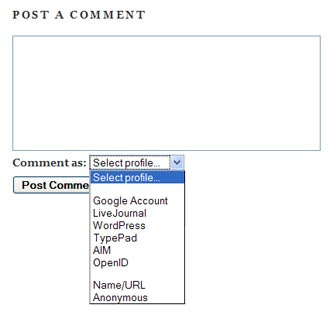
2. When the POST A COMMENT window appears, type your comment in that window.
3. When you finish typing your comment, use the
Comment as drop-down window to select a profile. If you have an account with one of the entities in the list, select that entity. Or select
Anonymous or
Name/URL.
4. If you select Name/URL, type your name and the URL of your Web site in the appropriate fields of the Edit Profile window, then click on the
Continue button.
Note: If you select an entity or Name/URL in the Profile drop-down menu, then a link to your blog or Web site will appear next to your name above your comment.
5. If you wish, click on the
Preview button to see what your comment will look like.
6. Click on the
Post Comment button to publish your comment.
Your comment will appear sooner or later depending on whether it requires moderation or not.


 This week's Surfin' finds old radio parts recycled as new radio art. The art of KY6R is very cool and I am sure you will enjoy viewing it.


