This week, Surfin’ demonstrates how ham radio can be a tricky, but well worth it.

Showing posts with label GPS. Show all posts
Showing posts with label GPS. Show all posts
Friday, June 15, 2012


Sunday, June 10, 2012
Nerdy People Trick
I own a TomTom XXL 550 GPS and have a subscription for quarterly map updates. I bought the GPS from Woot for $60 --- the map subscription costs more than the hardware.
Anyway, I get an e-mail a few days ago informing me that a new update was ready for me to download. So I connect my GPS to the Mac and run the update software, which downloads the update via the Internet and installs it in my GPS.
At DSL speeds, this is a few hour process, so while the download was in progress, I noticed that the GPS had an icon on my desktop as if it was another disk drive. So I decided to poke around and see what was stored in the GPS.
I found a folder called "Art" and in that folder was a subfolder called "Cars." I opened that folder and saw that it contained bitmapped images of the various vehicles you can choose to represent yours on the GPS. My choice was a green SUV that kind of resembles my green 2007 Subaru Outback Sport.
The nerd LED lit up over my head and I wondered if I could take a photo of my Subaru, Photoshop it so that it matches the size and format of the other images in the Cars subfolder. I took a few photos, played around with the images in Photoshop for about a half hour, and added a new image into the Cars subfolder.
After the map update was downloaded and installed, I checked to see if I could select my Subaru image from the TomTom options. My image was one of the options, so I selected it and tested it by and sure enough, my Subaru is now represented exactly by the GPS.
I can almost read the call sign on my car's license plate, but not quite!

Anyway, I get an e-mail a few days ago informing me that a new update was ready for me to download. So I connect my GPS to the Mac and run the update software, which downloads the update via the Internet and installs it in my GPS.
At DSL speeds, this is a few hour process, so while the download was in progress, I noticed that the GPS had an icon on my desktop as if it was another disk drive. So I decided to poke around and see what was stored in the GPS.
I found a folder called "Art" and in that folder was a subfolder called "Cars." I opened that folder and saw that it contained bitmapped images of the various vehicles you can choose to represent yours on the GPS. My choice was a green SUV that kind of resembles my green 2007 Subaru Outback Sport.
The nerd LED lit up over my head and I wondered if I could take a photo of my Subaru, Photoshop it so that it matches the size and format of the other images in the Cars subfolder. I took a few photos, played around with the images in Photoshop for about a half hour, and added a new image into the Cars subfolder.
After the map update was downloaded and installed, I checked to see if I could select my Subaru image from the TomTom options. My image was one of the options, so I selected it and tested it by and sure enough, my Subaru is now represented exactly by the GPS.
I can almost read the call sign on my car's license plate, but not quite!
Friday, June 17, 2011
Surfin’: Hammin’, Hackin’ and GPSin’
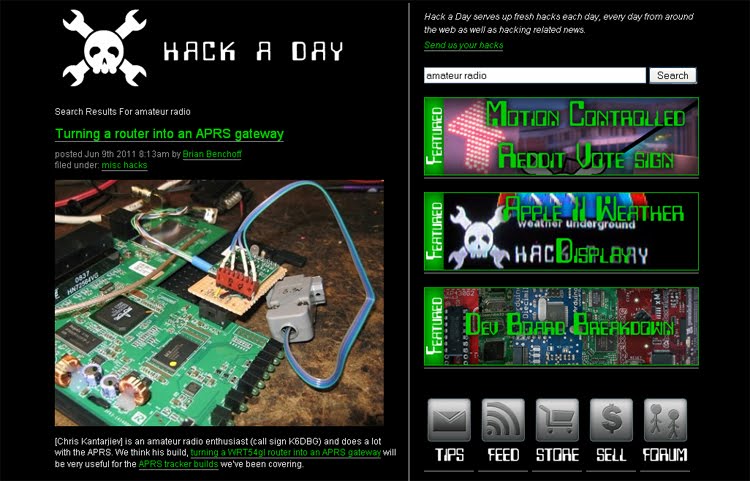
This week, Surfin’ considers hacking ham radio projects and one thing leads to another.
Friday, April 15, 2011
Surfin’: Tell Your Story

Friday, April 8, 2011
Surfin’: Got GPS? Maybe Not For Long!

Friday, June 20, 2008
Surfin': LOU on SDR and GPS
In this week’s Surfin’, we consider two initialisms that are on the cutting edge of Amateur Radio. After you read that, come back here to post your comments, if any.
By the way, Surfin’ is a weekly column published on ARRLWeb features Web sites related to Amateur Radio, specifically, and radio, in general. If you have any suggestions for Surfin’, please contact WA1LOU using the e-mail link to the right.
By the way, Surfin’ is a weekly column published on ARRLWeb features Web sites related to Amateur Radio, specifically, and radio, in general. If you have any suggestions for Surfin’, please contact WA1LOU using the e-mail link to the right.
Subscribe to:
Posts (Atom)